Top positive review
3 people found this helpful
Excellent System but still a little confusing for the non iOS
By J. Harris on Reviewed in the United States on May 7, 2019
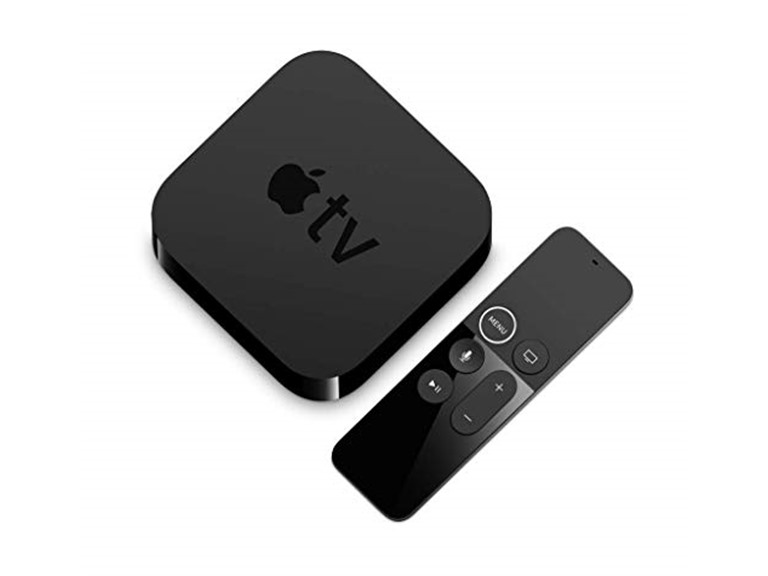
I have had the Apple TV 4k for a little over a week now and am very satisfied with it. A few comments based on reviews I read before I purchased: The Remote - Not as awful as everyone said. Yes, it's easy to select something or press the touchpad accidentally but I have had few issues overall. I don't think it's any worse than dropping my universal remote or hitting a wrong button on another remote. My only complaints about the Apple TV remote is that there is no mute button and it is quite small, so don't misplace it! UI - I'm not very familiar with the iOS environment. I have an iPhone but have only had it a couple of years so I'm still behind the function curve. Overall the system was mostly intuitive but I did make sure to familiarize myself with some online hints and tricks before it arrived so I knew how to navigate. App and menu interface - Someone mentioned in a review that all app menus were universally similar on the Apple TV. I found this to not be the case. As with any other device, Hulu, Netflix, Amazon and HBO all have their unique functionality. Up Next Feature - does not really work as advertised. I find it to be intermittent. Not all shows update like it said they would and not all appear on the home screen. Netflix specifically doesn't seem to play well with this feature, but overall each of the apps has failed to display the next episode of a show I have watched on the device. Quality and functionality - Quality and functionality is awesome. Content looks great and I have had few issues. Make sure you have an HDMI cable rated for 4k content or you will receive a warning (evidently I had an older one connected). The Apple TV connects easily to my iPhone for typing, filling in account fields and setting up. You can also download the Remote app from iTunes (to your phone) in order to use your phone as a remote, but I don't actually find this very convenient or helpful as I am perfectly happy with the remote. Biggest Con - Users of Bose Cinemate 130 beware. Evidently this system will not work with the Apple TV 4k. While I am able to connect sound from my Apple TV to the Bose system via direct input into the TV, I was not able to connect through the Bose Receiver. This is apparently a known issue to Bose, but they have no intention of fixing the issue leaving those of us that spent a significant amount of money to fend for ourselves. This was nearly devastating when I was trying to setup but thankfully I found a forum that directed me to a workaround. Summary - Overall I am quite happy with my purchase. I'm hoping after more updates the up next field is more accurate as it is pretty great to not need to jump into individual apps when your watching a series. I am also hopeful that eventually Spotify will be available via the Apple TV, but so far it isn't an option for download. Otherwise this is a great device that's easy to use and so much more reliable than the apps loaded into my Samsung Smart TV. Oh, and almost forgot to mention the screensaver. The photos (especially the aerial images) really are mesmerizing as another reviewer mentioned. My friends almost always comment about the cool images on the TV when they walk in, so just a minor added bonus if you needed one .
Top critical review
332 people found this helpful
I am John Wick using AppleTV 4K.
By Angry Llama on Reviewed in the United States on August 31, 2018
I generally used to regard the Apple brand as one of higher quality and integrity, but had never actually owned an Apple product. The fact that this product passed all of Apple's various stages of quality control and user experience testing to make it to market is incredible to me. I was going to wait until I had the chance to thoroughly test for all accolades and problems, but the list of problems grew inversely w/ my patience retention, so I had to stop collating and get to the review. = THE REMOTE = This remote needs no introduction. It is the spawn of Satan. It's the work of evil. After 30 minutes of trying to use this remote, you will look around the room for hidden cameras and pranksters watching from dark corners, and swear this remote is not for real and that you're being set up. You have read others' reviews- this remote is for real... in a bad, bad way. Handling the remote is like handling a venus flytrap. If you don't exercise an EXTREME AMOUNT OF CAUTION when touching, reaching for, picking up, or holding said venus flytrap, you will be bitten!! You WILL invariably and unintendedly activate something, go back, end app, skip something, bring up some weird menu, or trigger something bizarre, and you will have ONE RANDOM CHANCE IN 20 to undo it w/ out losing your place in whatever app you're in (streaming is H to the E to the double-bars). That's because the top 1/3 of the remote is a TOUCHPAD!! Apple made a remote out of a venus flytrap!! This remote sucks and the GUI that Apple has developed around it is ßeta at best. Over the last 10 years, we've all seen other companies /try/ to execute the touchpad remote (Panasonic), but Apple looks to embrace it fully and it unfortunately looks like the future of Apple remotes. ...but let's say you *lose* the venus flytrap. I know. Not Apple's fault. Can't blame Apple for that... or CAN'T I!?! Just LOOK at the number of people that have lost this... INCREDIBLY SMALL, CHEAP, THIN, SLITHERY piece of plastic! It must be in the millions by now! But, let's say you lose it. You pull out your iPhone and dial up the AppleTV app to control your AppleTV… brilliant! Except... the fooking app doesn't authenticate to the AppleTV directly via Bluetooth- it authenticates over the network! A lot of good THAT does you when you need the remote to type the password to get on the network. [FAIL] = USER EXPERIENCE = The user experience needs no contributions from the venus flytrap to be horrific. Most of my user experience has been restricted to MLB. Which, to that, you could say, "if you have problems with the MLB app, that is MLB's fault, not Apple's, right?" Wrong. I've seen MLB on the PC, PS3 (no longer supported), smartphone, and Roku. Hands down, AppleTV royally gets an 'F' for MLB streaming. Ultimately, Apple has accepted MLB's streaming solution and put it into their product... Apple's problem. 1. On every other platform, "next" in MLB is a 30-second skip forward or jump to next half of inning. On AppleTV- it's 10s of FF. I have to push the 'next' button TWELVE TIMES to get to the next half of inning. {sigh} That would be slightly acceptable IF IT ACTUALLY SKIPPED FORWARD 10 SECONDS. No. Sometimes, it skips 5 seconds, sometimes not at all. I'm sitting there for 60 seconds pushing next next next next next… to get thru 2 minutes of the same gd commercials I've seen 500x now from unsuccessfully attempting to jump to next half of inning. [FAIL] 2. I turn "HIDE SCORES" ON. I DON'T WANT TO SEE THE SCORES, MAN! Next time I wake up the AppleTV to watch a game, ALL THE SCORES ARE SHOWING! thx, AppleTV. I have gotten used to holding my hand over my eyes so that I can see only the top menu and scrolling through the venus flytrap menus with my venus flytrap to turn HIDE SCORES back ON. Sometimes, the scores /will actually be hidden/, but while I'm clicking thru venus flytrap menus trying to find my game in the calendar- POW - all the scores will appear. thx, AppleTV. 3. Using venus flytrap menus, I click enter on the top of the 1st inning... and it brings up top of 3rd inning, showing current score and everything. thx, AppleTV. Did I do something wrong? I go back. All the way back. Restart AppleTV. Bring up game navigating venus flytrap menus, click on top of 1st inning... top of 3rd shows up. Come on!! I actually have to start game from very beginning of ALL commercials and pre-game that I have already seen 10x now, and magically slide venus flytrap remote slider from 0:00:00 to the unknown starting time of top of first inning using tiny thumbnails as my guide that sometimes show up, sometimes do not. 4. I navigate the venus flytrap menus to my game, press enter, and it starts playing the game from 2 days prior. Or 1 day later. Or a different team! Wha? Did I do something wrong?? I go back. And right before I click enter on my game, date/matchup randomly changes to a different one. Sometimes, AppleTV shows me "NO GAMES SCHEDULED" and I'm thinking... uh, no games scheduled on a Sunday? Wrong. On a Friday?? Wrong. 5. Commercials. Oh, man. What AppleTV and MLB appears to be doing is pushing commercials dynamically between innings. What this does is forces me to watch 5 minutes of commercials in between innings that I *KNOW* from being at the ballpark only last 2 minutes. And- if I try to FF, everything will either freeze or start playing from a random point in the game that is completely different than what the timeline shows! Wha?? If I try to drag the venus flytrap slider to the beginning of next inning and accidentally (VERY EASY TO DO!!) drop it just a touch in the 'commercial' timeframe, it starts all the commercials over from the very beginning and forces playback of all. This is COMPLETE rubbish!! This does not happen on ANY OTHER PLATFORM!! This reason alone is worth avoiding AppleTV. 6. What's the first thing any techie support person will ask you when you're having problems w/ your device... "Have you restarted the device?" To restart this flipping unit, I have to scroll, click, glide, back, etc. ad nauseam. Or crawl into the cabinet and unplug the unit from power. Given the frequency of problems this piece of junk encounters, there should be a "RESTART" option when I hold down the button that brings up the "SLEEP" option. Instead, Apple wants you to 'enjoy' the navigational experience of venus flytrap (remote) and venus flytrap menus. = BOTTOM LINE = It would be impossible to oversell this product's terribleness. This is my first AppleTV, so I do not have other models to compare to nor do I have helpful advice on alternative AppleTV models to purchase. My recommendation would be to at least stay away from the AppleTV 4K model if not go with a Roku unit altogether. I have seen the Roku, I have used the Roku, and I prefer the Roku. So does everyone else in my family. I just had to be different. About 50% of the time, I am unable to watch a game w/out seriously wanting to smash this AppleTV on the concrete and enjoy the explosion of AppleTV inerts. I am John Wick using AppleTV.
Sort by:
Filter by:
By -
Verified Amazon Purchase
Vine Customer Review of Free Product
Sorry, no reviews match your current selections.
Try clearing or changing some filters.Show all reviews
Show more reviews